---
title: "Navigate the HTML Composer"
slug: "html-composer"
updated: 2026-08-17T12:32:12Z
published: 2026-08-19T08:43:52Z
canonical: "docs.grassfish.com/html-composer"
---
> ## Documentation Index
> Fetch the complete documentation index at: https://docs.grassfish.com/llms.txt
> Use this file to discover all available pages before exploring further.
# Navigate the HTML Composer
With the HTML Composer, you can design your own spots with custom content.
- Use text, media, widgets, and dynamic data such as news updates, weather information, or stock charts.
- Enhance your spot content with animations, effects, and interactive elements.
> [!NOTE]
> Note
>
> The HTML Composer is based on HTML, so the spots you create can be viewed on almost any type of hardware.
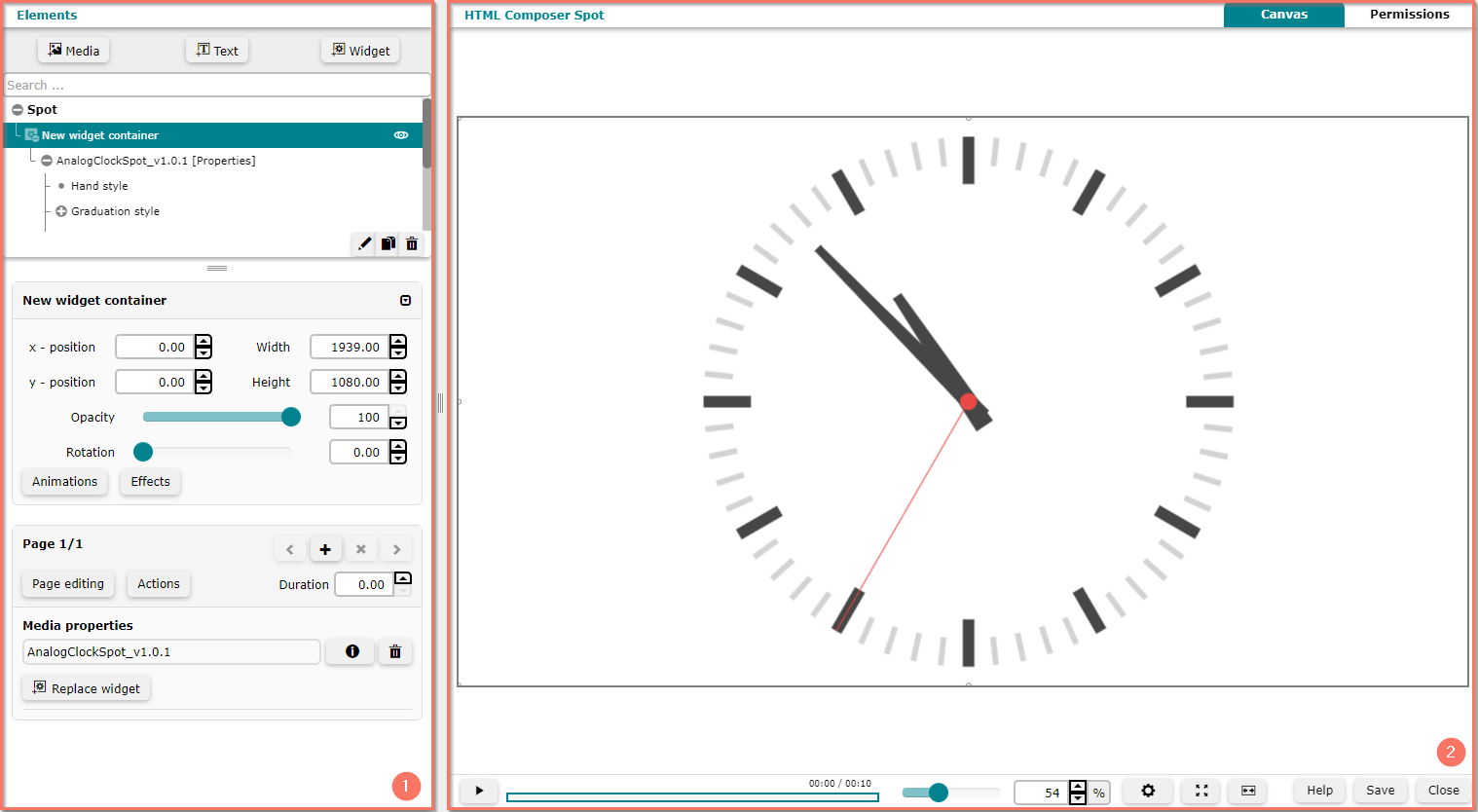
The HTML Composer is divided in two sections:
| **1** | [Elements](/grassfish/docs/design-composer-spots): Use this area to configure spot elements and properties such as resolution or duration. |
| --- | --- |
| **2** | [Canvas](/grassfish/docs/create-composer-spots): Use this area to see the spot's elements and a preview of the whole spot. [Permissions](/grassfish/docs/set-permissions-1): Use this area to specify who can edit spot elements and properties. |