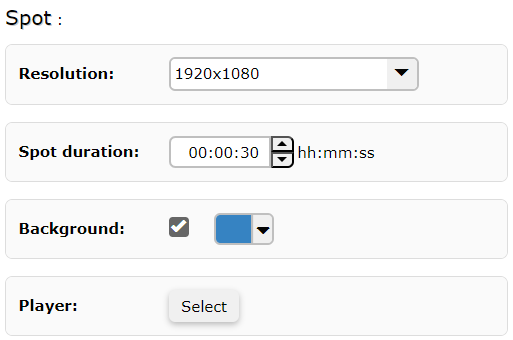
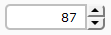
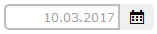
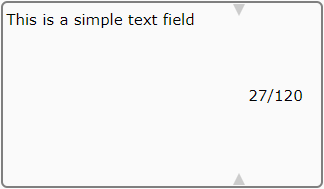
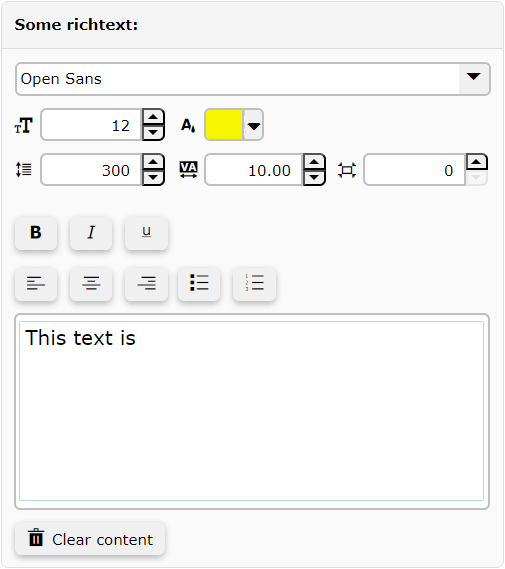
--- title: "Manage HTML spot elements" slug: "manage-elements" updated: 2026-08-17T12:47:24Z published: 2026-08-19T08:44:05Z canonical: "docs.grassfish.com/manage-elements" --- > ## Documentation Index > Fetch the complete documentation index at: https://docs.grassfish.com/llms.txt > Use this file to discover all available pages before exploring further. # Manage HTML spot elements The [**Elements** pane in the HTML Wizard](/grassfish/docs/html-wizard) displays all spot elements that you can manage. - The spot elements you see depend on the spot. - The [spot developer](/grassfish/docs/html-wizard-spots) determines in the spot files which elements are displayed and how. - Spots usually contain general elements such as duration, resolution, or media elements. > [!NOTE] > Note > > Some elements are mandatory fields that you must edit to play the spot. ## Spot properties You can edit the following general spot properties: | **Property** | **Description** | **HTML Wizard** | | --- | --- | --- | | **Resolution** | Select a spot resolution from the dropdown menu. | ![](https://cdn.document360.io/e2b87f73-d9f5-43cb-8182-2641762664fd/Images/Documentation/manage-elements-image-dxkkvjlc.png?sv=2026-02-06&spr=https&st=2026-11-06T20%3A17%3A33Z&se=2026-11-06T21%3A17%3A33Z&sr=c&sp=r&sig=3RLRsC9baWDhXiZtf2TvKe2Mmr6Xsnv4iOLseKv4hok%3D) | | **Duration** | Specify the duration of the spot in the format **hh:mm:ss**. | | **Background** | Select this option to set the background color of the spot. - You can select a color or enter RGB values or a HEX code. - If you don't select this option, the spot uses the same background color as the playlist. | | **Player** | Click on **Select** to select a player for the preview. | ## Basic elements You can edit the following basic elements in the HTML Wizard: | **Element** | **Description** | **HTML Wizard** | | --- | --- | --- | | **Number picker** | Click on the arrows to enhance or decrease a number. | ![](https://cdn.document360.io/e2b87f73-d9f5-43cb-8182-2641762664fd/Images/Documentation/manage-elements-image-003zdfam.png?sv=2026-02-06&spr=https&st=2026-11-06T20%3A17%3A33Z&se=2026-11-06T21%3A17%3A33Z&sr=c&sp=r&sig=3RLRsC9baWDhXiZtf2TvKe2Mmr6Xsnv4iOLseKv4hok%3D) | | **Dropdown** | Click on the arrow and select an item from the dropdown menu. | ![](https://cdn.document360.io/e2b87f73-d9f5-43cb-8182-2641762664fd/Images/Documentation/manage-elements-image-unqe0xhm.png?sv=2026-02-06&spr=https&st=2026-11-06T20%3A17%3A33Z&se=2026-11-06T21%3A17%3A33Z&sr=c&sp=r&sig=3RLRsC9baWDhXiZtf2TvKe2Mmr6Xsnv4iOLseKv4hok%3D) | | **Checkbox** | Select to enable an option. | ![](https://cdn.document360.io/e2b87f73-d9f5-43cb-8182-2641762664fd/Images/Documentation/manage-elements-image-8etbhxf2.png?sv=2026-02-06&spr=https&st=2026-11-06T20%3A17%3A33Z&se=2026-11-06T21%3A17%3A33Z&sr=c&sp=r&sig=3RLRsC9baWDhXiZtf2TvKe2Mmr6Xsnv4iOLseKv4hok%3D) | | **Color picker** | Select a color or enter RGB values or a HEX code. | ![](https://cdn.document360.io/e2b87f73-d9f5-43cb-8182-2641762664fd/Images/Documentation/manage-elements-image-sjngtxpz.png?sv=2026-02-06&spr=https&st=2026-11-06T20%3A17%3A33Z&se=2026-11-06T21%3A17%3A33Z&sr=c&sp=r&sig=3RLRsC9baWDhXiZtf2TvKe2Mmr6Xsnv4iOLseKv4hok%3D) | | **Time picker** | Click on the arrows to specify a time. | ![](https://cdn.document360.io/e2b87f73-d9f5-43cb-8182-2641762664fd/Images/Documentation/manage-elements-image-b67rahcd.png?sv=2026-02-06&spr=https&st=2026-11-06T20%3A17%3A33Z&se=2026-11-06T21%3A17%3A33Z&sr=c&sp=r&sig=3RLRsC9baWDhXiZtf2TvKe2Mmr6Xsnv4iOLseKv4hok%3D) | | **Date picker** | Click on the calendar icon to select a date. | ![](https://cdn.document360.io/e2b87f73-d9f5-43cb-8182-2641762664fd/Images/Documentation/manage-elements-image-23lsnuqb.png?sv=2026-02-06&spr=https&st=2026-11-06T20%3A17%3A33Z&se=2026-11-06T21%3A17%3A33Z&sr=c&sp=r&sig=3RLRsC9baWDhXiZtf2TvKe2Mmr6Xsnv4iOLseKv4hok%3D) | | **Simple text** | Enter free text. The character limit is displayed in the field. | ![](https://cdn.document360.io/e2b87f73-d9f5-43cb-8182-2641762664fd/Images/Documentation/manage-elements-image-le2n8q6b.png?sv=2026-02-06&spr=https&st=2026-11-06T20%3A17%3A33Z&se=2026-11-06T21%3A17%3A33Z&sr=c&sp=r&sig=3RLRsC9baWDhXiZtf2TvKe2Mmr6Xsnv4iOLseKv4hok%3D) | ## Rich text elements You can edit the following rich text elements in the HTML Wizard: | **Element** | **Description** | **HTML Wizard** | | --- | --- | --- | | **Font selection** | Select a font from the dropdown menu. - IXM One standard installation includes freely available fonts. - If you want to add custom fonts, please contact your Grassfish partner. | ![](https://cdn.document360.io/e2b87f73-d9f5-43cb-8182-2641762664fd/Images/Documentation/manage-elements-image-0x5ccici.png?sv=2026-02-06&spr=https&st=2026-11-06T20%3A17%3A33Z&se=2026-11-06T21%3A17%3A33Z&sr=c&sp=r&sig=3RLRsC9baWDhXiZtf2TvKe2Mmr6Xsnv4iOLseKv4hok%3D) | | **Font size** | Click on the arrows to enhance or decrease the font size. | | **Font color** | Select a color or enter RGB values or a HEX code. | | **Line height** | Click on the arrows to enhance or decrease the line height. | | **Character spacing** | Click on the arrows to enhance or decrease the character spacing. | | **Edge distance** | Click on the arrows to enhance or decrease the distance to the margin of the element window on the canvas. | | **Text field** | Enter free text and style it using bold, italic, underline styles, text alignment, or lists. | | **Clear content** | Click to clear the text field. | ## Media elements You can edit the following media elements in the HTML Wizard: | **Element** | **Description** | **HTML Wizard** | | --- | --- | --- | | **Add medium** | Click and select a medium. | ![](https://cdn.document360.io/e2b87f73-d9f5-43cb-8182-2641762664fd/Images/Documentation/manage-elements-image-10fxr7j2.png?sv=2026-02-06&spr=https&st=2026-11-06T20%3A17%3A33Z&se=2026-11-06T21%3A17%3A33Z&sr=c&sp=r&sig=3RLRsC9baWDhXiZtf2TvKe2Mmr6Xsnv4iOLseKv4hok%3D) | | **Replace medium** | Click to replace a medium with another one. | ![](https://cdn.document360.io/e2b87f73-d9f5-43cb-8182-2641762664fd/Images/Documentation/manage-elements-image-99gto6nh.png?sv=2026-02-06&spr=https&st=2026-11-06T20%3A17%3A33Z&se=2026-11-06T21%3A17%3A33Z&sr=c&sp=r&sig=3RLRsC9baWDhXiZtf2TvKe2Mmr6Xsnv4iOLseKv4hok%3D) | | **Change order** | Click on the arrows to move elements up and down. | ![](https://cdn.document360.io/e2b87f73-d9f5-43cb-8182-2641762664fd/Images/Documentation/manage-elements-image-rpv4axyz.png?sv=2026-02-06&spr=https&st=2026-11-06T20%3A17%3A33Z&se=2026-11-06T21%3A17%3A33Z&sr=c&sp=r&sig=3RLRsC9baWDhXiZtf2TvKe2Mmr6Xsnv4iOLseKv4hok%3D) | | **Crop medium** | Click to crop the medium. | ![](https://cdn.document360.io/e2b87f73-d9f5-43cb-8182-2641762664fd/Images/Documentation/manage-elements-image-91aghl70.png?sv=2026-02-06&spr=https&st=2026-11-06T20%3A17%3A33Z&se=2026-11-06T21%3A17%3A33Z&sr=c&sp=r&sig=3RLRsC9baWDhXiZtf2TvKe2Mmr6Xsnv4iOLseKv4hok%3D) | | **Delete** | Click to delete a medium. | ![](https://cdn.document360.io/e2b87f73-d9f5-43cb-8182-2641762664fd/Images/Documentation/manage-elements-image-09qdcnxb.png?sv=2026-02-06&spr=https&st=2026-11-06T20%3A17%3A33Z&se=2026-11-06T21%3A17%3A33Z&sr=c&sp=r&sig=3RLRsC9baWDhXiZtf2TvKe2Mmr6Xsnv4iOLseKv4hok%3D) | ## Warning icons You may see the following icons when working in the HTML Wizard: | **Icon** | **Description** | **HTML Wizard** | | --- | --- | --- | | **Error** | One or more spot elements contains errors. | ![](https://cdn.document360.io/e2b87f73-d9f5-43cb-8182-2641762664fd/Images/Documentation/manage-elements-image-l7a11inl.png?sv=2026-02-06&spr=https&st=2026-11-06T20%3A17%3A33Z&se=2026-11-06T21%3A17%3A33Z&sr=c&sp=r&sig=3RLRsC9baWDhXiZtf2TvKe2Mmr6Xsnv4iOLseKv4hok%3D) | | **To-do** | One or more spot elements contain incomplete to-dos. You can save a spot with incomplete to-dos, but it will be inactive. That means, it can't be played. | ![](https://cdn.document360.io/e2b87f73-d9f5-43cb-8182-2641762664fd/Images/Documentation/manage-elements-image-13wt9c2s.png?sv=2026-02-06&spr=https&st=2026-11-06T20%3A17%3A33Z&se=2026-11-06T21%3A17%3A33Z&sr=c&sp=r&sig=3RLRsC9baWDhXiZtf2TvKe2Mmr6Xsnv4iOLseKv4hok%3D) |